 Mongoose













Building a Web File Manager on STM32, ESP32, and Embedded Linux with Mongoose Wizard
Embedded systems often require a simple and reliable way to interact with the device's internal storage. Whether for diagnostics, logging, or configuration, a web interface that enables file upload, download, and deletion can dramatically improve development efficiency and end-user experience. In this article, we demonstrate how to build a web file manager using Mongoose Web Server and the Mongoose Wizard across three platforms: Embedded Linux, ESP32, and STM32.
See working example here: https://github.com/cesanta/embedded-web-file-manager. Note: it differs slightly from the video cause the Wizard API has evolved.
Why a Web File Manager?
A web file manager lets users interact with files stored on an embedded device through a web browser. With drag-and-drop uploads and clickable file links, it becomes easy to handle firmware logs, configuration files, or even firmware updates without needing serial tools or command-line access.
Step 1: Create the File Manager Dashboard
We start by designing a web-based UI using the Mongoose Wizard:
- Visit Mongoose Wizard using Chrome or Edge browser
- Start a new project. Select the target platform (Linux/Mac/Windows)
- Choose “Blank Dashboard”
- In the bottom panel, choose "UI elements" tab, add "Panel"
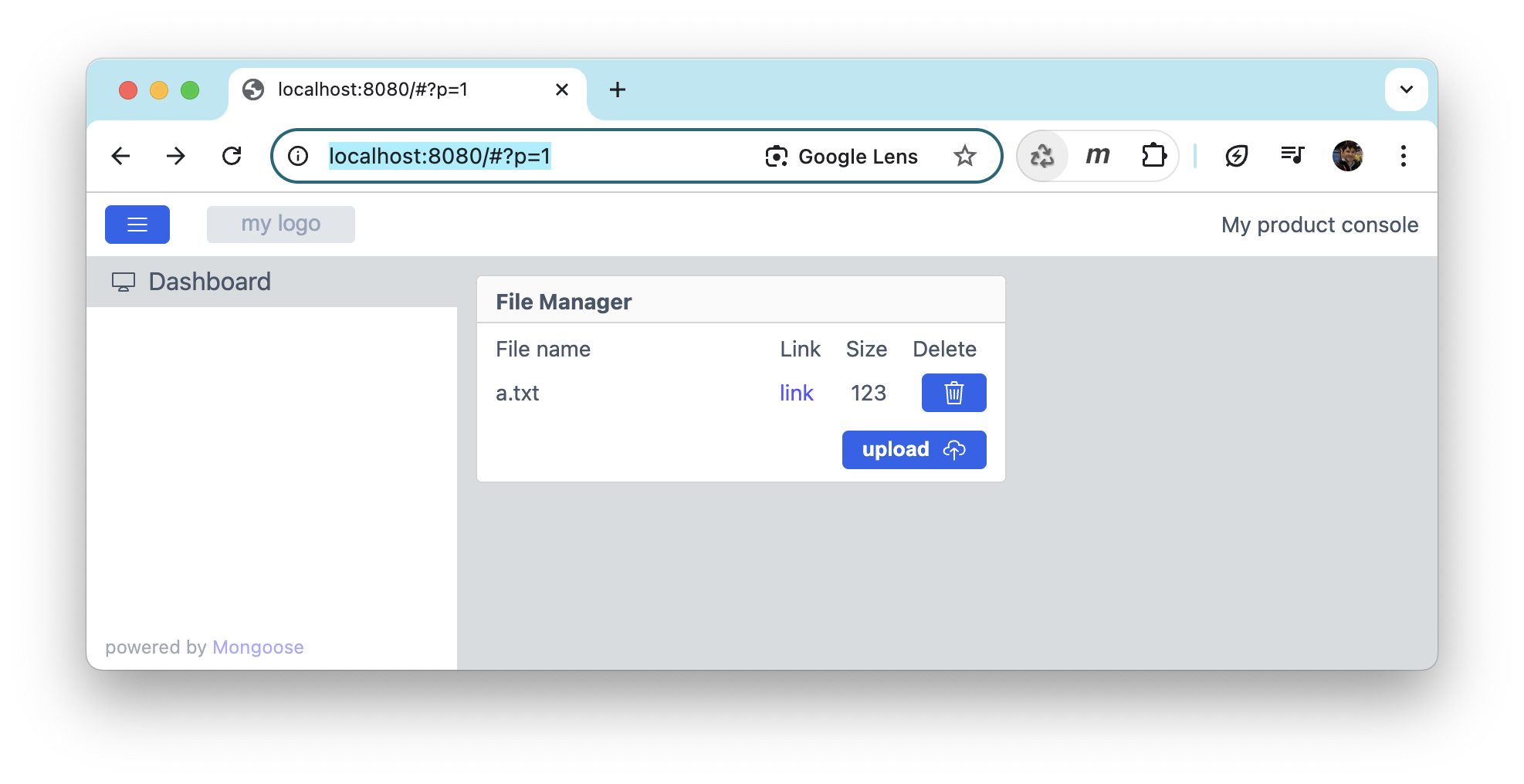
- Add a list view to show uploaded files (name, size, link, delete button)
- Add a file upload button. Rename file API endpoint to "fs"
The Wizard automatically sets up HTTP endpoints for uploading (/api/fs/FNAME), listing (/api/files), and deleting files (/api/delete), allowing full file lifecycle management.
Step 2: Implement Custom Handlers
The wizard generates placeholder handlers in mongoose_glue.c. We replace them with custom implementations in main.c:
my_file_{read,write}_fshandle upload/downloadmy_get_filesreturns a JSON array of uploaded filesmy_action_start_deletedeletes files synchronously
Here is the source code for the reference.
2.1: Listing files
In the UI, we have a row which is bound to the files API endpoint of type
array. The Wizard then generates array getter function, which we override this
way:
bool my_get_files(struct files *data, size_t i) {
  char buf[256] = "";  // Important: initialise to empty
  while (mg_fs_ls(s_fs, s_dir, buf, sizeof(buf))) {
    char path[sizeof(buf) + 20];
    size_t size = 0;
    mg_snprintf(path, sizeof(path), "%s/%s", s_dir, buf);
    //MG_DEBUG(("FILE: [%s]", path));
    if (i-- == 0) {
      s_fs->st(path, &size, NULL);
      mg_snprintf(data->name, sizeof(data->name), "%s", buf);
      data->size = (int) (long) size;
      return true;
    }
  }
  return false;
}
This function "lists" i's file in the upload directory s_dir by populating
its name and size into the data variable. Mongoose calls this function
iteratively with the incrementing i until it returns false which marks
the end of an array. Then Mongoose sends the entire files array to the
UI, and the UI renders a row per file entry.
2.2: Uploading and serving files
This gets called when we upload a file. For large files, this functions
can be called repeatedly with incrementing offset. We open a file and
append there.
Note that all this code uses s_fs which is set to mg_fs_posix, i.e.
it uses POSIX stdio API. If your firmware does not provide a POSIX filesystem,
override these functions to use whatever storate you're using. If you're
using FAT FS, simply change mg_fs_posix to mg_fs_fat. Otherwise, you
might implement your own FS abstraction, point the s_fs to it, and keep
all functions intact.
bool my_file_write_fs(char *name, size_t offset, void *buf, size_t len) {
  char path[256];
  struct mg_fd *fd;
  mg_snprintf(path, sizeof(path), "%s/%s", s_dir, name);
  fd = mg_fs_open(s_fs, path, MG_FS_WRITE);
  MG_INFO(("path: %s, ofs: %lu, buf: %p, len: %lu", path, offset, buf, len));
  if (fd != NULL) {
    fd->fs->sk(fd->fd, offset);
    fd->fs->wr(fd->fd, buf, len);
    mg_fs_close(fd);
  }
  return true;
}
This is called when we viewing a file:
size_t my_file_read_fs(char *name, size_t offset, void *buf, size_t len) {
  char path[256];
  struct mg_fd *fd;
  mg_snprintf(path, sizeof(path), "%s/%s", s_dir, name);
  fd = mg_fs_open(s_fs, path, MG_FS_READ);
  MG_INFO(("path: %s, ofs: %lu, buf: %p, len: %lu", path, offset, buf, len));
  if (fd != NULL) {
    fd->fs->sk(fd->fd, offset);
    len = fd->fs->rd(fd->fd, buf, len);
    mg_fs_close(fd);
  } else {
    len = 0;
  }
  return len;
}
2.3: Deleting files
File deletion:
bool my_check_delete(void) {
  return false;  // File deletion is never in progress
}
void my_start_delete(struct mg_str params) {
  char path[256];
  struct mg_str name = mg_json_get_tok(params, "$.name");
  if (name.len >= 2 && name.buf[0] == '"') name.len -= 2, name.buf++;
  mg_snprintf(path, sizeof(path), "%s/%.*s", s_dir, name.len, name.buf);
  MG_DEBUG(("Deleting file: [%s]", path));
  s_fs->rm(path);
}
2.4 Overriding handlers
The initialisation snippet - it comes right after the mongoose_init():
  s_fs->mkd(s_dir);
  mongoose_set_http_handlers("delete", my_check_delete, my_start_delete);
  mongoose_set_http_handlers("files", my_get_files, NULL);
  mongoose_set_http_handlers("fs", my_file_read_fs, my_file_write_fs);
Step 3: Porting to ESP32
For ESP32 file upload, we target the ESP32-C6 board using ESP-IDF. After generating the ESP32 project with the Wizard:
- Replace the backend logic with the same handlers used on Linux
- Use
/spiffsas the upload directory (ESP32’s SPIFFS filesystem is POSIX-compliant) - Set Wi-Fi credentials in
wifi.h - Build with Docker and flash the firmware
- Access the ESP32's IP address in a browser to test ESP32 file upload functionality
This allows full ESP32 file upload support with browsing and deletion directly via the web UI.
Step 4: Porting to STM32 with CubeIDE and FreeRTOS
For STM32 file upload, we use the Nucleo-H563ZI development board. The board lacks external storage, but its internal flash can be used to implement a POSIX-style stm32 filesystem using LittleFS.
Steps:
- Generate the CubeIDE project with FreeRTOS enabled
- Enable POSIX FS and directory listing in
mongoose_config.h - Copy
dirent.hand requiredlittlefsfiles (lfs.c, lfs.h, retarget_lfs.c) - Modify
syscalls.cto mark functions like_open,_read, and_writeas weak to resolve linker conflicts with newlib - Configure the filesystem to use the final 128KB of internal flash
After flashing, open the board’s IP in a browser and test STM32 file upload. The stm32 filesystem supports full read/write/delete capabilities through the dashboard UI.
Final Result
The result is a cross-platform web file manager that:
- Works on Embedded Linux, ESP32, and STM32
- Supports ESP32 file upload and STM32 file upload
- Uses a consistent HTTP API and UI layout across all platforms
- Leverages Mongoose's built-in web server and filesystem abstraction
Whether you’re building a device dashboard, an OTA update panel, or just need to move files to/from your hardware, this setup delivers fast, reliable, and repeatable functionality.
Conclusion
Implementing a web file manager for embedded systems has never been easier. With Mongoose Wizard and POSIX-compatible filesystems, full-featured ESP32 file upload and STM32 file upload support can be achieved in just an hour. Integrate it once and reuse across your product lines.
For full code examples and board-specific tips, visit https://mongoose.ws.