 Mongoose







mDash device management
mDash is a cloud backend for connected products. Its main purpose to provide remote firmware update, remote device control, and health monitor. It is supposed to be used together with a product-specific cloud service.
mDash is available as a managed service at https://mdash.net, as well as private on-premises installation.
How to enable mDash
Assuming Mongoose is already integrated in your firmware (if not, follow the Integration Guide),
Step 1. Login to https://mdash.net, create a device and copy the device password in the clipboard:
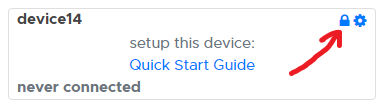
Step 2. Edit mongoose_config.h, enable mDash and set the password:
#define MG_ENABLE_MDASH 1
#define MG_MDASH_KEY "..."           // Paste the copied password here
#define MG_FIRMWARE_VERSION "1.0.0"
#define MG_TLS MG_TLS_BUILTIN
Step 3. Rebuild and reflash
How to perform firmware OTA update
Step 1. Rebuild your firmware .bin file
Step 2. Use Web UI on https://mdash.net to update: click on the "download"
button, and select the .bin file:
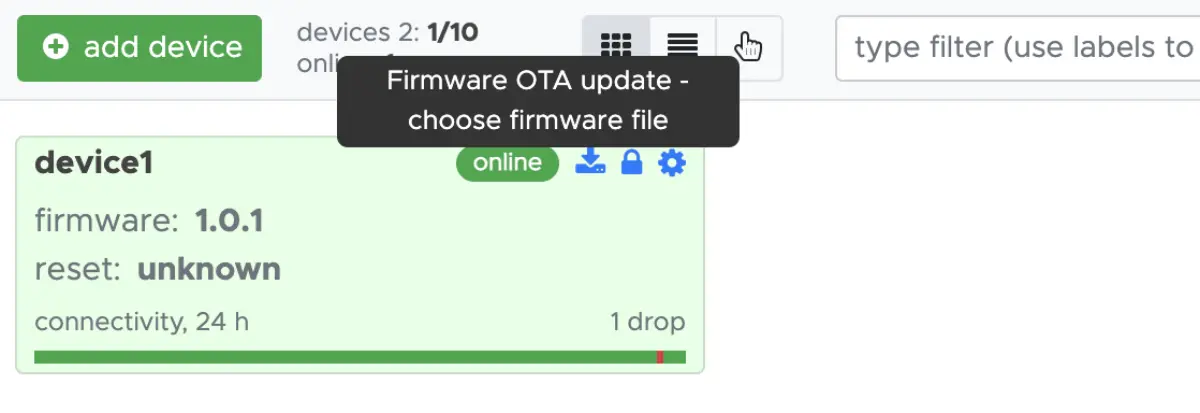
Alternatively, use can use automation or curl. Get your API key from
https://mdash.net/#/keys, then run this command:
curl -su :MDASH_API_KEY -F file=@FIRMWARE.BIN https://mdash.net/api/v2/devices/DEVICE_ID/ota
How to implement device control
The device connects to mDash using secure Websocket link, where it exchanges JSON-RPC frames. There are several built-in JSON-RPC functions implemented by the mDash connector inside Mongoose, but it is possible to add any number of custom JSON-RPC functions. mDash bridges all JSON-RPC requests automatically to HTTP REST.
Let's demonstrate that by implementing a function that lets us read and write any pin remotely. Add that to your main.c:
static void mg_rpc_sys_pin(struct mg_rpc_req *r) {
  int pin = (int) mg_json_get_long(r->frame, "$.params.pin", -1);
  int val = (int) mg_json_get_long(r->frame, "$.params.val", -1);
  if (pin >=0 && val >= 0) {
    hal_gpio_write(pin, val);  // Both pin and val are set: write pin
    mg_rpc_ok(r, "true");
  } else if (pin >= 0) {
    mg_rpc_ok(r, "%d", hal_gpio_read(pin)); // Only pin is set: read pin
  } else {
    mg_rpc_err(r, 500, "%m", MG_ESC("set pin and val"));
  }
}
  // Add after mg_mgr_init():
  mg_rpc_add(&mgr.rpcs, mg_str("Sys.Pin"), mg_rpc_sys_pin, NULL);
Rebuild and reflash. Then you can call your RPC:
curl -su :$MDASH_API_KEY https://mdash.net/api/v2/devices/device1/rpc/Sys.Pin -d '{"pin": 0}'
curl -su :$MDASH_API_KEY https://mdash.net/api/v2/devices/device1/rpc/Sys.Pin -d '{"pin": 0, "val": 0}'
To get a list of all RPCs,
curl -su :$MDASH_API_KEY https://mdash.net/api/v2/devices/device1/rpc/RPC.List
See also: JSON-RPC reference.
How to enable Health Monitor
Currently, Health Monitor is implemented for STM32H7 and STM32H5 series. To enable it, follow the steps below:
Update the linker script file, add this to the no-init RAM region:
  /* Retained health record. Startup code must neither copy nor clear it. */
  .mg_health (NOLOAD) : { KEEP(*(.mg_health .mg_health*)) } > ram_d3
In your mongoose_config.h, enable health monitor:
#define MG_ENABLE_HEALTH 1
That line enables several IRQ handlers - for HardFault, etc. If you're using CubeMX, disable IRQ generation for those in System Core / NVIC.
In your main(), add this line at the very beginning:
int main(void) {
  MG_HEALTH_INIT();  // <-- Add this!
While not necessary, you can add this debug log after the mg_mgr_init():
MG_INFO(("Crash record: %M", mg_print_crash_record));
Rebuild and reflash. Now, if you're using mdash, you'll get crash backtrace in case if your device crashes. You can either upload the firmware .elf file after the flashing or OTA, or you can download the crash core file and analyse it locally. Change `firmware.elf if required:
arm-none-eabi-gdb -q -nx --batch \
  -ex 'set auto-load off' \
  -ex 'set debuginfod enabled off' \
  -ex 'set print frame-arguments none' \
  -ex 'set backtrace past-main on' \
  -ex 'file firmware.elf' \
  -ex 'core-file crash.core' \
  -ex 'bt'
This is how it looks like on the dashboard when .elf is uploaded:
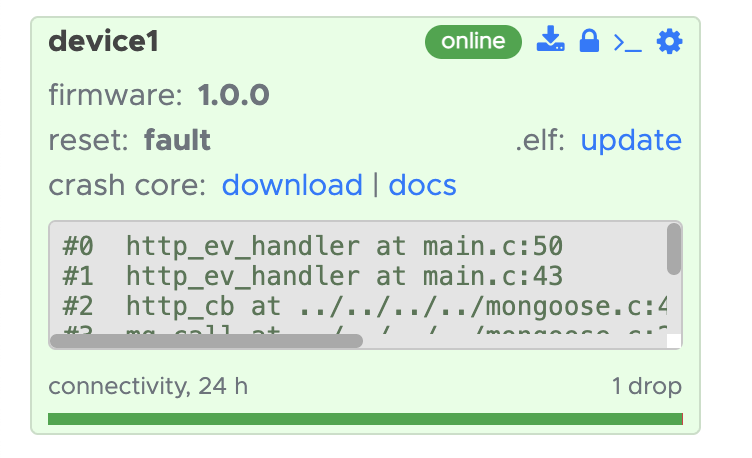
Note: the
.elffiles are associated with firmwares by firmware version. That means, once you upload an.elffile, it will work for all devices with the same version. Therefore, make sure to update theMG_FIRMWARE_VERSIONwhen rebuilding your firmware after changes.